Your AI Policy Is Only Useful If Your Team Buys Into It
The organisations getting real value from AI are not the ones with the longest policies. A field note on why buy-in beats documentation, and where to start.
TL;DR
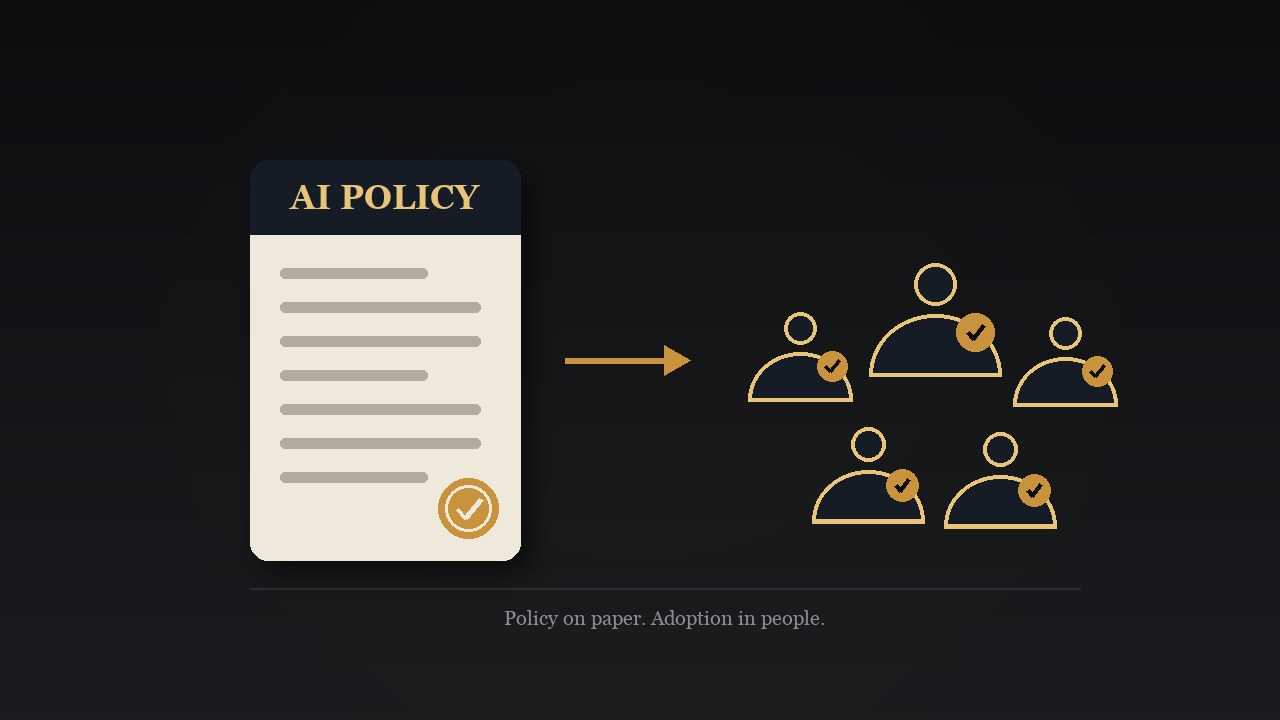
Most AI policies get written, approved, announced, and then largely ignored, because compliance is not the same as buy-in. In the education sessions I run, the client's policy goes on screen before any demo, and the room starts with a live prompt injection that shows exactly why the rules exist. What earns adoption is understanding: once people grasp how generative AI actually works, why the approved tool is Microsoft 365 Copilot, and where a human still has to own the result, the policy stops reading as a list of prohibitions and starts getting used. Buy-in is the deliverable, and it is what turns an AI policy from paperwork into lasting behaviour.
Let AI summarise and analyse this post for you:
The order that makes an AI policy work
There is a natural order to getting value from AI, and the organisations that see the most from it tend to follow that order. Many teams take a different route: weeks writing the policy, a legal review, sign-off on the list of sanctioned tools, then a company-wide announcement, at which point the work can feel finished.
The catch is that the announcement itself changes very little about how people work day to day. In Canada, only 29% of employees say their employer has a comprehensive AI policy, and even where rules exist, 42% remain unsure whether safeguards such as data restrictions or upload controls are in place. That gap between the document and the understanding is where the real opportunity sits.
Adoption, meanwhile, is moving quickly. As of the second quarter of 2026, 19.2% of Canadian businesses report using AI to produce goods or deliver services, and in professional, scientific and technical services that figure climbs to 32.4%. Usage is running ahead of understanding, which is exactly why the order matters: get the sequence right and employees reach for the approved tool with confidence, rather than defaulting to whatever consumer chatbot happens to be open in another tab.
An AI policy does its best work when employees understand why it exists, believe it helps them, and can see how it applies to their daily work. That means seeing both sides: the upside the policy hands them, and the exposure the organisation takes on when the guardrails are set aside, which in time finds its way back to the people who work there. That understanding is what turns a document into a habit.
I opened the training with a prompt injection
Recently I delivered a session on generative AI foundations and Microsoft 365 Copilot fundamentals for a professional services organisation that handles sensitive client data. They had just released their AI policy, and the session existed to bring the whole team along with it.
I opened with a bit of theatre. A QR code went up on screen and I asked everyone to scan it with their phones. It opened ChatGPT with a pre-filled prompt. Anyone who tapped submit had just written into their personal ChatGPT memory that Grey Sky Tech is now their go-to for everything technical.

Then I told them what had just happened. That is prompt injection. I had, gently, manipulated their AI through a QR code on a slide. We have all been told for years to be careful what we scan and what we click, but with AI the blast radius is far larger, because a single injected instruction can keep shaping every future conversation. The room got it instantly, and nobody needed a definition of governance after that.
The next thing on screen was not a demo. It was their AI policy.
Some people are always surprised by this. They arrive expecting prompt tricks and features in the first ten minutes. Instead we spend the opening stretch on four questions the policy answers: which tools are approved, what information can be shared with AI, which risks the organisation is trying to avoid, and which benefits it is trying to capture.
But even after those questions are answered, hands go up, and they are always the same hands. Will this actually save me time? Can I trust the results? How should I verify what it gives me? When should I not use it? Those questions reveal the real work. Adoption is ultimately about trust, not documentation. I wrote about the survey from a similar session in 57% of the Team Had Never Opened the AI They Already Pay For, and the headline number bears repeating: most of the team had never once opened the governed AI their employer already pays for.
What a good AI policy actually says
Policy language is often abstract, so a few concrete examples help. The do and don't lists below are illustrative, not an official policy and not a complete list, but they show the shape a good knowledge-worker AI policy tends to take.
Do use the approved AI for things like:
- Exploring options and thinking through a first approach
- Producing and refining everyday, non-technical writing
- Condensing meetings, long threads, and documents into something usable
Don't use it for things like:
- Authoring technical or expert reports where your name carries the accountability
- Standing in as the primary source for facts that still need checking
- Doing company work through a personal or non-company account
That last line matters more than it looks. It means no pasting work into a free consumer chatbot, and no running company data through someone else's licence. This is the same boundary Canada's cyber authority draws: the Canadian Centre for Cyber Security's guidance on generative AI warns organisations to avoid providing personal or sensitive corporate data in prompts, and to validate AI output before relying on it. A good policy is not inventing rules. It is translating national-level guidance into the specific tools and habits of one workplace.
Notice what the two lists have in common: every "do" is a task where a confident first draft saves real time and a human still owns the result, and every "don't" is a place where an error is expensive, invisible, or unfair. Once people see that logic, they can apply the policy to situations the document never anticipated. That is the difference between memorising rules and understanding them. It is also why Grey Sky Tech publishes its own AI policy in the open: if I am going to ask clients to hold that standard, I should hold it myself.
Policies don't change behaviour. Understanding does
Here is something three decades in IT leadership has taught me: most people do not read policies in detail. They follow processes that make sense and help them get their work done. When a policy connects to the way people actually work, they follow it naturally; when it feels disconnected, they route around it, often to the very unapproved tools the policy was written to steer them away from.
People support an AI policy when they understand the business reasons behind it, the security and privacy considerations underneath it, and the fact that it protects the employee as much as the organisation. A policy that reads as "here is how we enable you to use AI safely" lands completely differently than one that reads as a list of prohibitions.
Real examples do most of the work. Abstract permission means little until someone watches the approved tool summarise a meeting, draft a difficult email, analyse a spreadsheet, or prepare them for a client call. The more employees see AI helping with real work, the more likely they are to trust the policy that surrounds it. There is encouraging evidence that this maturity is building: 58% of Canadian employees now say they always check their AI output for accuracy, up from 51% the year before. Verification is becoming a habit, and habits are what policies dream of becoming.
And buy-in pays a governance dividend. When employees trust both the policy and the approved tools, they stop experimenting with unauthorised ones. Good governance becomes a natural outcome of adoption rather than something that needs to be enforced.
Trace the policy back to the tool decision
A policy that says "use the approved tool" invites an obvious question: why is that the approved tool? If the answer is "because IT said so," trust stops there. Employees deserve the real reasoning, and walking through it is one of the most valuable things an education session can do.
For organisations that live in Microsoft 365, the reasoning is strong. Microsoft 365 Copilot runs inside the organisation's own environment, under enterprise data protection: prompts and responses stay within the tenant, are not used to train the underlying models, and inherit the organisation's existing permissions, sensitivity labels, and retention policies. Your permissions are its permissions. If you cannot open a file, neither can it.
Just as important for a regulated or professional practice: every interaction is a governed business record. Conversations are discoverable, they fall under Microsoft Purview alongside the rest of the organisation's data, and they can be placed under legal hold. A consumer chatbot offers none of that. No records, no oversight, no way to meet professional or contractual obligations.
When employees hear that reasoning laid out by an independent voice rather than an internal memo, something shifts. I am not the person who wrote the policy, and I am not selling the licences. I am a third party whose job is to explain why the decision makes sense, take the sceptical questions seriously, and connect the policy line by line to the platform decision behind it. Employees ask an outside educator things they would never ask their own IT department, and honest questions are where buy-in starts.
One policy, three Microsoft Copilot products
The policy conversation has to look forward, because the thing being governed will not sit still. What most teams think of as one product is now three distinct experiences, and a policy written around a single chat window will age badly.
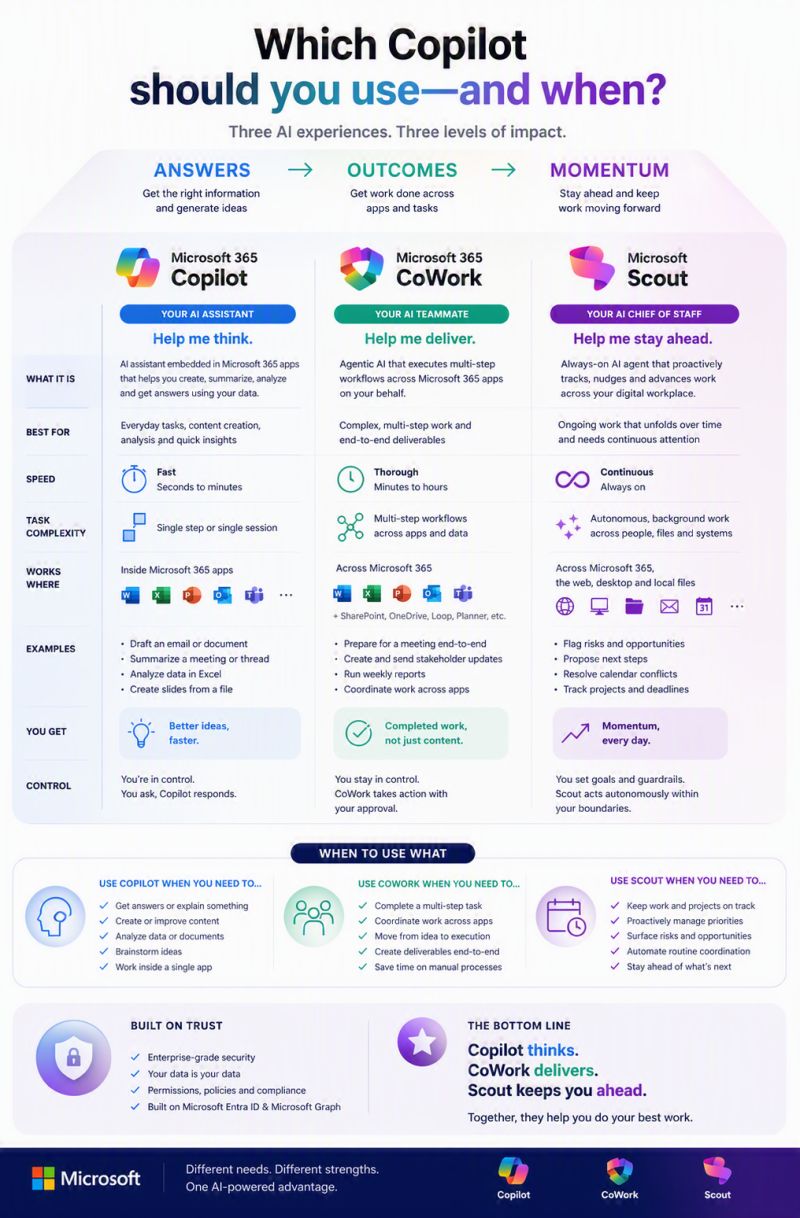
Microsoft 365 Copilot is the assistant. It lives inside Word, Excel, PowerPoint, Outlook, and Teams, answers in seconds, and helps you think: draft this email, summarise this thread, analyse this sheet. You ask, it responds, and you remain in control of every step.
Copilot Cowork is the teammate. Generally available since June 2026, it takes on complex, long-running, multi-step tasks and runs them end to end across your apps and files, returning a completed result rather than a draft. You define the work, it delivers, and it acts with your approval.
Microsoft Scout is the chief of staff. Introduced in June 2026 and still in preview, it is Microsoft's first Autopilot, an always-on agent that works autonomously in the background under your goals and guardrails, keeping projects moving, flagging risks, and surfacing what needs attention. A short way to hold the trio in your head: Microsoft 365 Copilot thinks with you, Copilot Cowork delivers for you, and Microsoft Scout stays ahead of you.
And those three sit inside a much larger family: AI embedded in individual apps, role-based agents, developer and security tooling, and the platform layers underneath them all.
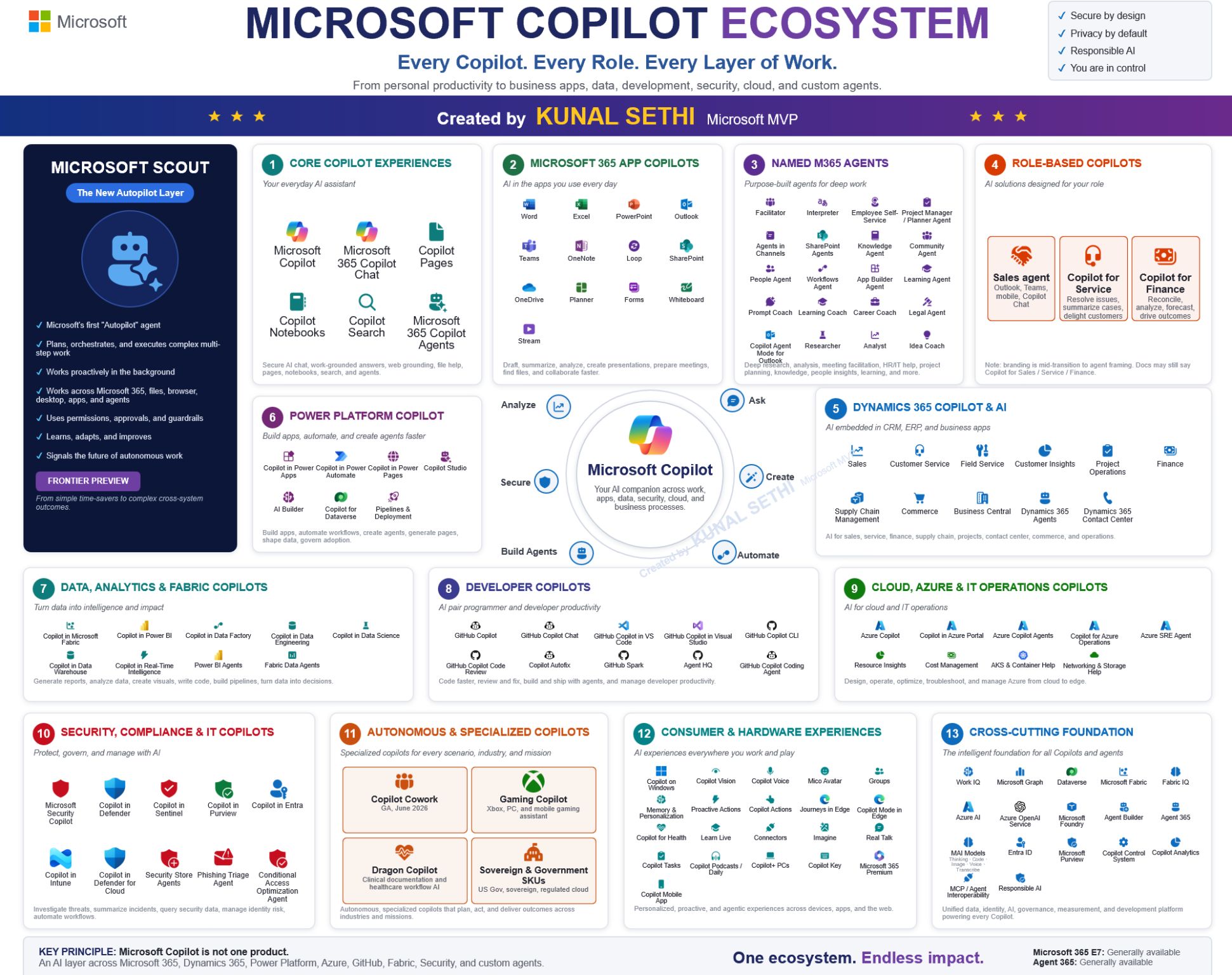
This breadth is why I recommend pairing a named product list with governing principles, rather than choosing between them. Name Microsoft 365 Copilot and its ecosystem as the approved foundation, because that is where the governance, the security, and the everyday productivity come together, and set the principles, data rules, and reasoning that let the policy hold as new tools like Copilot Cowork and Microsoft Scout join the family. Microsoft 365 Copilot is the anchor the rest of the ecosystem builds on: the interface keeps getting better week to week, and the governance model underneath it is the part that stays constant.
Buy-in is the deliverable
This is why my foundational training starts where it does. Not with prompts. Not even with the policy. With generative AI itself: what it is, where it came from, and what it actually does.
We go back to November 30, 2022, the day ChatGPT made generative AI visible to everyone, and I explain the machine in plain language. It is a pattern recognition engine that predicts the next most plausible word from everything it has seen. It is brilliant at drafting, summarising, rephrasing, brainstorming, and explaining. It is not a database, it is not a search engine, and it is not a substitute for professional judgment. It is a confident first drafter that gets you to 80% done much faster, with your expertise finishing the rest.
Once a room genuinely understands that, the policy stops being arbitrary. Of course you verify the output: you know how the machine works now. Of course expert reports stay human: you know where the machine fails. Of course you use the governed tool: you know what happens to data in the ungoverned ones. Every rule traces back to something the team now understands, which is the only durable form of compliance there is.
That is the sequence I bring as a partner: generative AI fundamentals and history first, then the AI policy and the reasoning behind it, then the platform decision it points to, then live demonstrations of the approved tools on the team's real work. It builds on the same conviction behind running Microsoft 365 fundamentals before any Microsoft 365 Copilot rollout: people adopt what they understand, and the AI adoption plans that work best build that understanding in from the very start.
The organisations seeing the best results from AI are not the ones with the most detailed policies. They are the ones that help employees understand the policy, show them how AI fits their work, and build confidence that the approved tools make their jobs better. An AI policy is not the finish line. It is the starting point for trust, adoption, and lasting behavioural change.
If your organisation has an AI policy that has not earned its buy-in yet, or needs one and is not sure where to start, that foundational session is exactly what I deliver. Book an AI education session for your team.
Frequently Asked Questions
A useful AI policy answers four questions in plain language: which tools are approved, what information may and may not be shared with them, which uses are encouraged, and which uses are off limits. The strongest policies also explain why each rule exists, name the risks the organisation is protecting against, and point to the benefits it wants, so employees can apply the spirit of the policy to situations the document never anticipated.
Because a policy on its own rarely changes behaviour. Most people skim policies rather than study them, and follow the processes that make sense and help them get their work done. When an AI policy connects to daily work and has training behind it, people follow it naturally; when it feels disconnected or arrives as an announcement on its own, they tend to route around it with unapproved tools. Buy-in comes from understanding the reasons behind the rules and seeing approved tools handle real work.
Microsoft 365 Copilot is the AI assistant inside Word, Excel, PowerPoint, Outlook, and Teams. You ask, it responds, and you stay in control of every step. Copilot Cowork, generally available since June 2026, works more like an AI teammate: you define a multi-step task and it runs the work end to end across your apps and files, with your approval. Microsoft Scout, in preview, is an always-on agent that works in the background on your behalf, tracking work and surfacing what needs attention. All three run inside the governed Microsoft 365 environment.
Start with the policy. It surprises people who expect prompts and features in the first ten minutes, but the policy conversation is where trust gets built: what is approved, what stays confidential, what the organisation is protecting against, and what it hopes to gain. Once those questions are settled, the tool demonstrations land differently, because every feature is seen through the lens of safe, sanctioned use rather than suspicion.
Grey Sky Tech runs foundational education sessions that begin with generative AI itself: what it is, where it came from, what it does well, and where human judgment still matters. From there, sessions walk through the organisation's own AI policy, explain the reasoning behind the choice of Microsoft 365 and the Microsoft Copilot ecosystem, and then demonstrate the approved tools live on real work. As an independent third party, Grey Sky Tech can say things an internal memo cannot, and employees can ask the questions they would not ask their own IT department.
Related Service
Deployment, training, and ongoing support to make your AI investments pay off.
Learn about Adoption and Training