Page 63, 1994: Thirty Years of Building Ahead of the Curve
Three decades of building, from a 1994 island BBS to today, and the events page and mailing list I run on Microsoft 365 for Business at zero monthly cost.
TL;DR
This week, an old friend sent me a link to a .pdf scan of the 1994 Salt Spring Island business guide, and there I am on page 63, running a bulletin board system (BBS) out of a spare room at 28.8 kilobits a second. Thirty-some years later I am doing the same thing at heart: building simple, friendly ways for people to reach information, and betting early on where technology is going. So this post does two things. It tells that story, from green screens and dial-up modems to an internet domain I have owned since 1997. And it launches two more of them, Where's Anu, a live events page, and a mailing list to go with it, both running on the Microsoft 365 for Business you may already pay for, for nothing extra each month.
Let AI summarise and analyse this post for you:
Page 63, 1994
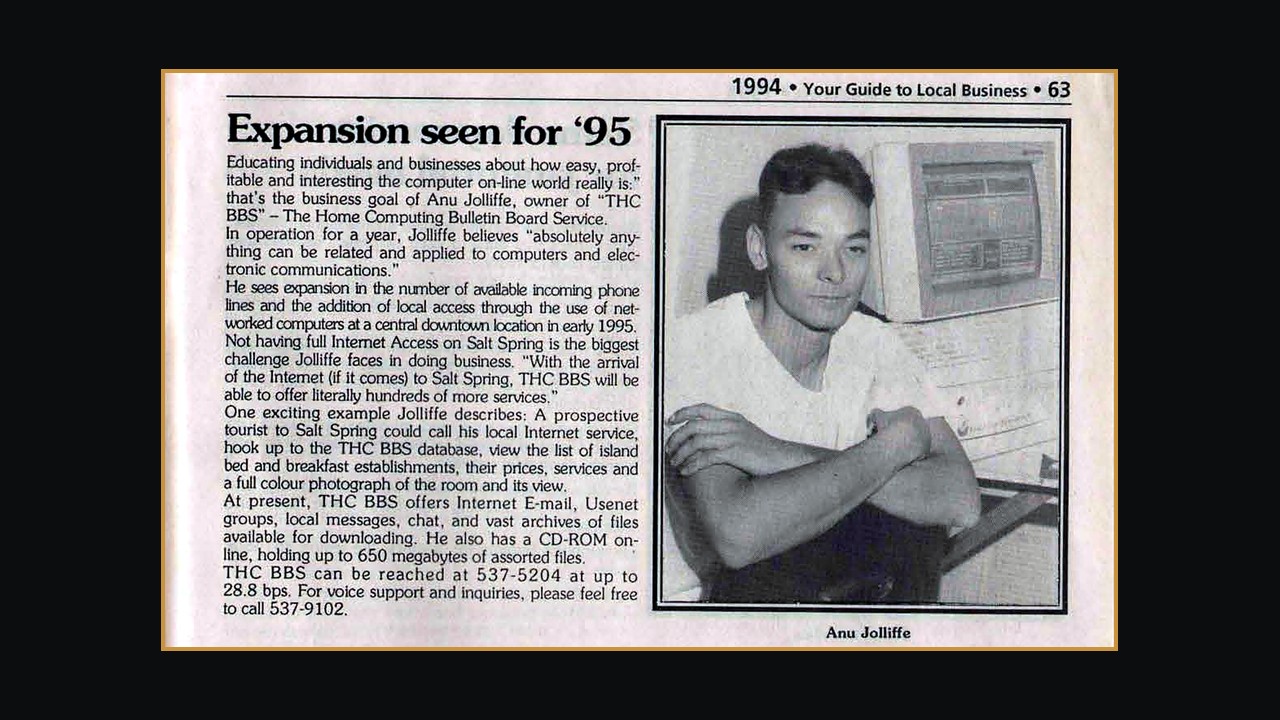
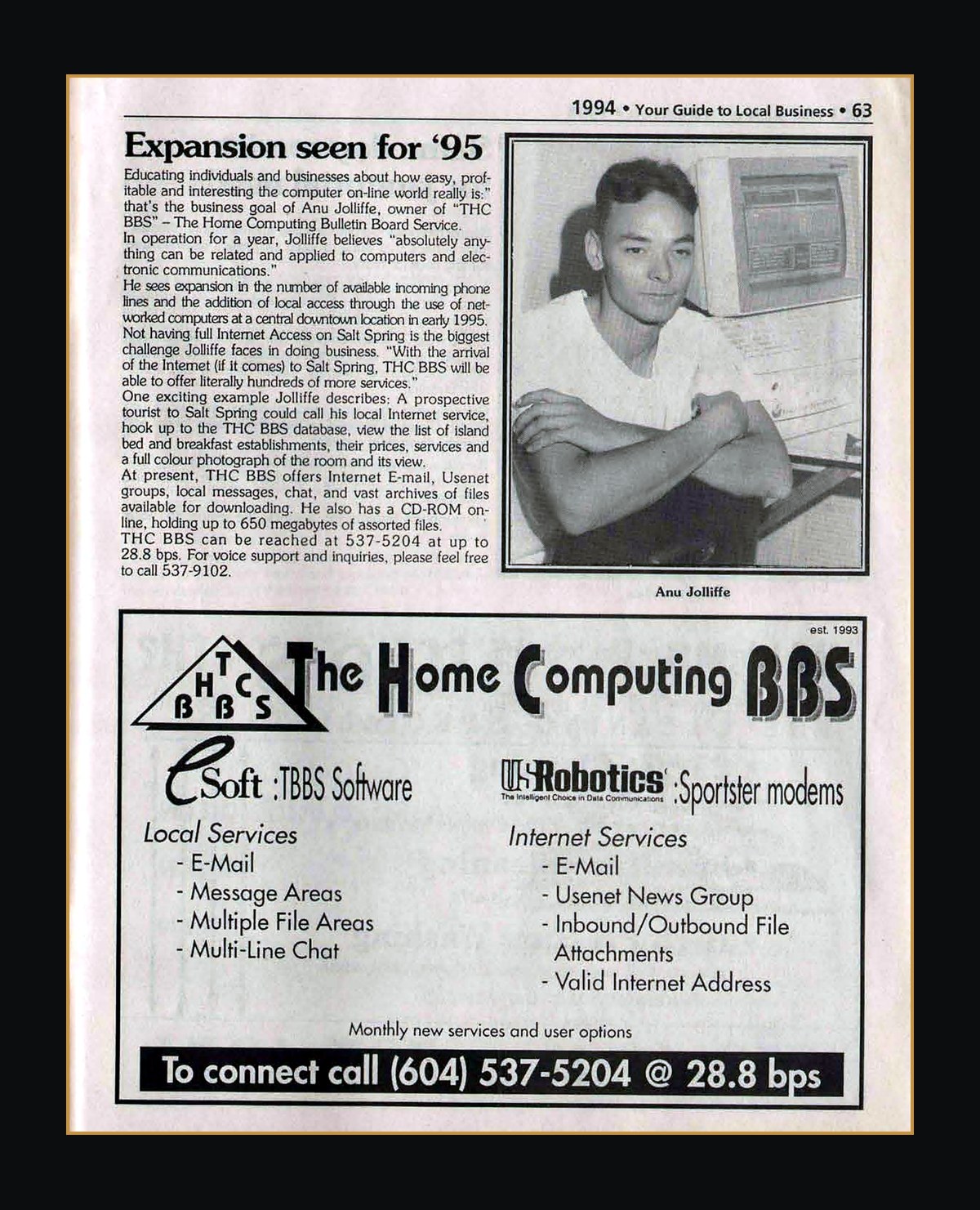
An old friend pointed me to the Salt Spring Island Archives. Buried in the 1994 edition of Your Guide to Local Business, on page 63, is a photograph of a very young me, a questionable haircut, and a beige tower running a bulletin board I called The Home Computing BBS. The write-up is headed "Expansion seen for '95." My whole business at the time was a computer in a room, a couple of internal modems, and a phone number: 537-5204, at up to 28.8 kilobits a second.
Look past the hair and the speeds and feeds, and you can see what I was actually doing. I was building a way for people to dial in from wherever they were and reach content: message boards, files, email, Usenet, and a 650 megabyte CD-ROM I kept online.
It did real business, too. In 1995 I built an online marketplace on the BBS for Galaxy Collectibles, a shop I literally shared a wall with, and one that ran its own listing in that same guide. Collectors dialled in from all over the world to buy and sell rare Magic: The Gathering cards and sports memorabilia, and in the first year we moved about $250,000 US across those phone lines. An online marketplace, reached by modem, before most of us had heard the word e-commerce.
The guide even describes a feature I was dreaming up, a database where a visitor could pull up a Salt Spring bed and breakfast, see its rates, and look at a full colour photograph of the room. In 1994. Hold that thought, because it comes back later.
From green screens to something graphical
The bulletin board ran on software called TBBS, The Bread Board System, which could handle dozens of callers at once on a single machine, each in their own session of message areas, file libraries, and multi-line chat. To everyone who dialled in, it was a green screen and a blinking cursor. That was the interface of the day, and it worked, but I kept thinking it could be friendlier.
So I got involved in something more ambitious. A software developer named Dwight Jones, at a Gulf Islands company called Imagen Communications, had written RTC, short for rich-text-compressed. RTC took a rich document, added hyperlinks, images, sound, and support for dozens of languages, then squeezed it into a few kilobytes you read in a Windows viewer called RTCNET. It was pitched as a rival to Adobe's PDF, a fraction of the size, and it ran alongside the web browsers that were just finding their feet, Mosaic and Netscape, the latter still carrying its internal codename, Mozilla, because it had to be a "Mosaic Killer."
Two roads were being paved at once, and nobody yet knew which one the world would take. The browsers won. But working on RTC put me right in the middle of the question that has defined my whole career: what is the simplest, richest way to put information in front of a person? That work led to helping Imagen roll out internet service across the Gulf Islands, just as the islands were getting online for the first time.
1996: from a bulletin board to the open internet
By 1996 the internet had well and truly arrived, and I moved from running a bulletin board to hosting the real thing. I stood up servers on FreeBSD, a rock-solid Unix-like operating system, and ran BIND, the name server software that translated domain names into addresses for much of the internet, and still underpins a great deal of it. On top of that I ran a web server. That year the ground shifted under everyone: Apache overtook the older NCSA server to become the most used web server on the internet, a position it would hold for more than a decade. To keep pages moving over slow island connections, I ran a caching proxy called Squid, which had been released for the first time that very year.
None of it was glamorous. It was configuration files and late nights. But it was the same instinct as the bulletin board, one layer down: build the plumbing so that other people can simply use the thing and never have to think about it.
canmex.com, 24 July 1997
On 24 July 1997 I registered my first domain name. I still own it. It is canmex.com, and I registered it for my mother.
She ran a vacation rental business in Ixtapa and Zihuatanejo, on the Pacific coast of Mexico. She managed short stays in other people's holiday properties, handled the bookings and the guests, and took a management fee. If that sounds familiar, it should. She was running an Airbnb, roughly a decade before Airbnb existed, and I built her a website for it, showing the properties and photographs of the rooms, with availability, prices, and bookings. A similar idea I had sketched out for Salt Spring bed and breakfasts in 1994, now real, and paying for itself.
It stopped for the hardest reason. My mother passed away, unexpectedly, and the business went with her. I have kept the domain ever since. Nearly thirty years on, canmex.com is still mine, a small reminder that being early is not the same as being lucky, and that the good ideas usually arrive before the world is ready to name them.
Curiosity still runs the shop
I still build websites, and I still let curiosity do the driving. When something new turns up, I would rather try it, guess where it goes, and learn by building than wait for a case study to tell me it was safe. That is the thread that runs all the way back to page 63.
Which brings me to the reason this post exists. Today I am officially launching Where's Anu, a live listing of the AI, data, and tech-adjacent events around Victoria, plus the occasional virtual one, that I actually go to or recommend. Each one has the details, a registration link, and a short, honest note from me about why it is worth your evening.
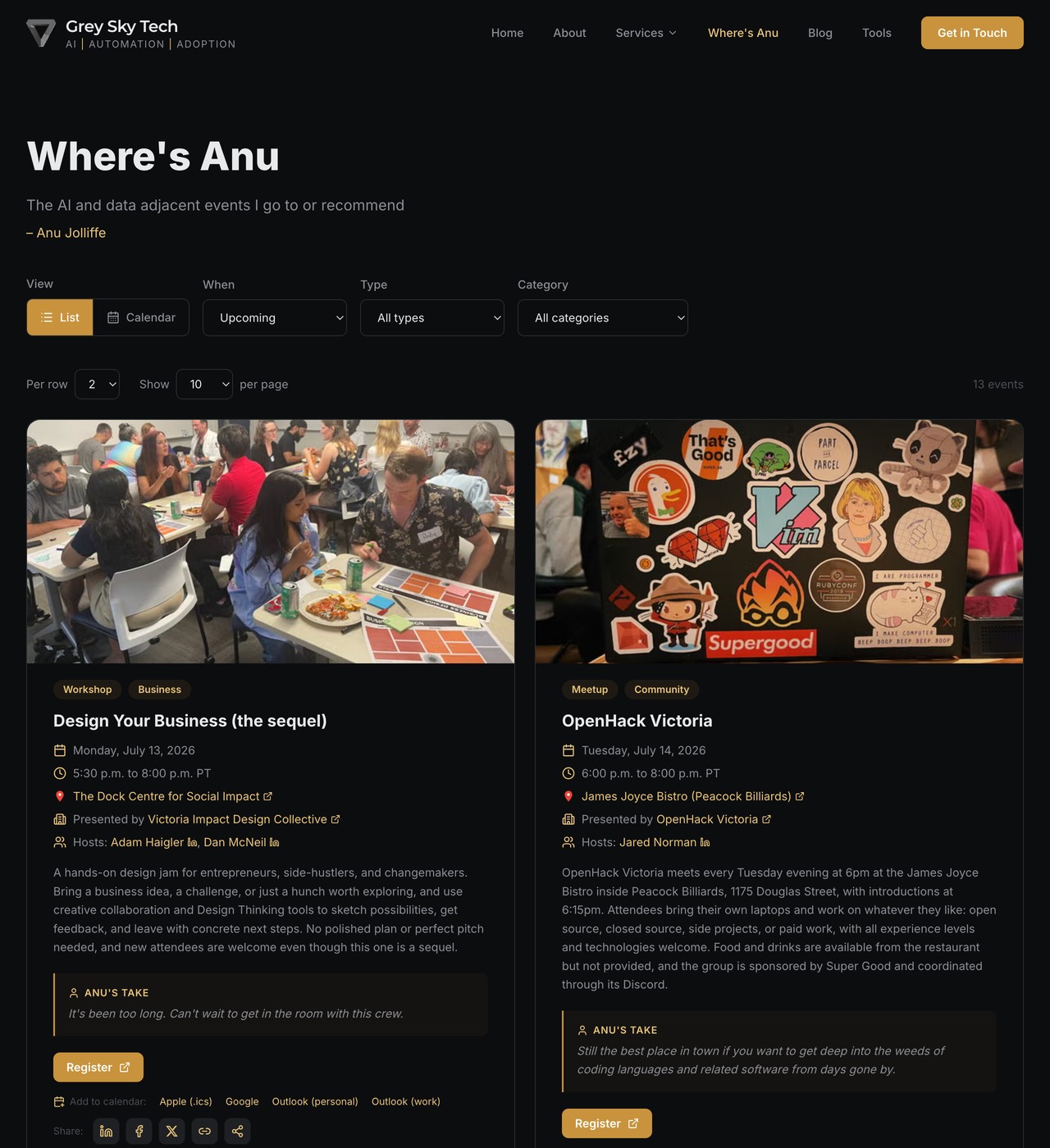
On the surface it is a tidy events page. Underneath is the part I am actually excited about.
What makes this genuinely new
The front of Where's Anu is a modern website: the code lives on GitHub and the pages run on Next.js, the same framework behind a lot of the fast, polished sites you use every day. That part is ordinary. Here is the part that is not.
The events do not live in some third-party events tool with its own login and its own monthly bill. They live in a SharePoint list, which is really just a simple online table like a shared spreadsheet, inside my own Microsoft 365 tenant, the private space only my business can see. It is the same Microsoft 365 for Business you very likely already use every day for email, Teams, and files. Where I say Microsoft 365 in this post, I mean the paid Microsoft 365 for Business plans, the ones most companies already run on.
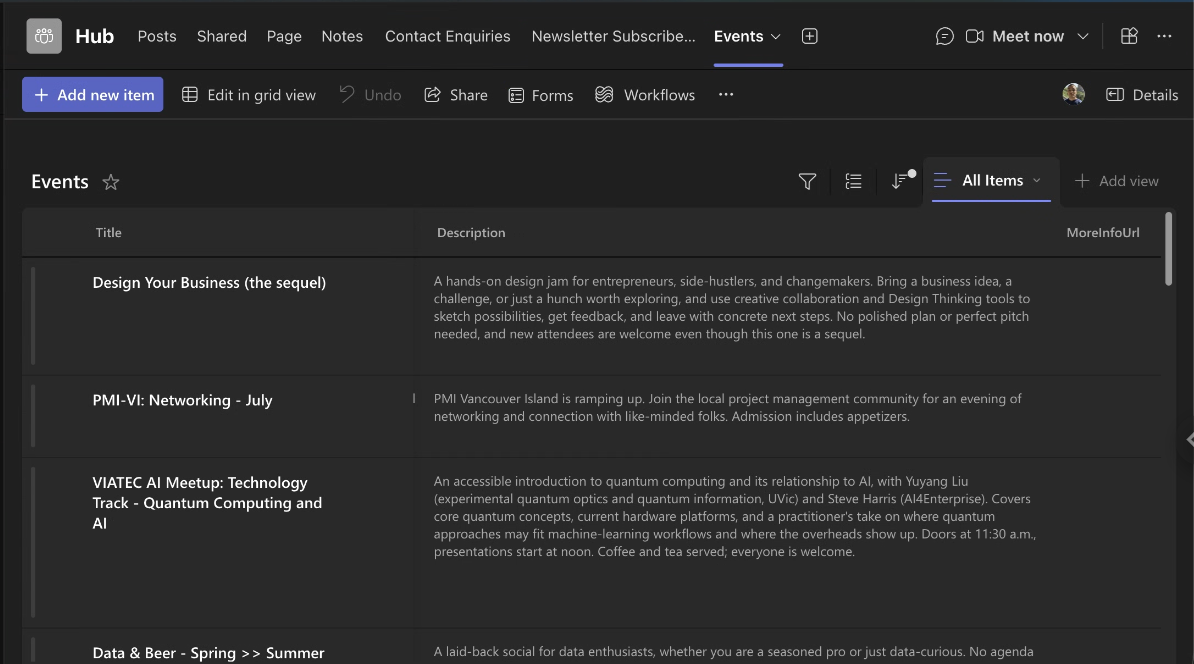
That one decision changes everything. Because the events are a SharePoint list, I can add or edit one from the SharePoint web view, from a Microsoft Teams tab, from my phone, or from anything else that can talk to Microsoft 365. There is no separate admin panel to learn. And because it is a proper list in my tenant, the rest of the Microsoft 365 world can reach it too. I can ask the same Microsoft 365 Copilot your team may already pay for about it. I can report on it, set up a Power Automate flow off it, or wire it into another system, all with tools that are already included. The website is one nice window onto data that stays mine.
A mailing list that costs nothing extra
I stood up the other half of this launch the same way: a mailing list, so people can get a note when something good is coming up. It behaves like the mailing-list products you already know, and it rides on the Microsoft 365 subscription you already pay for.
Here is the whole flow. You enter your email on the website. The address is stored in a list in my tenant, right next to the events. You get an email asking you to confirm it really is you, the double opt-in step that keeps a list clean and legitimate. Once you confirm, you are on, and every email carries a one-click unsubscribe. A Cloudflare Turnstile check sits on the form to keep the bots out, without making you decode a fire hydrant. Every message along the way, the confirmation, the welcome, the updates, the goodbye, is mine to customise however I like.
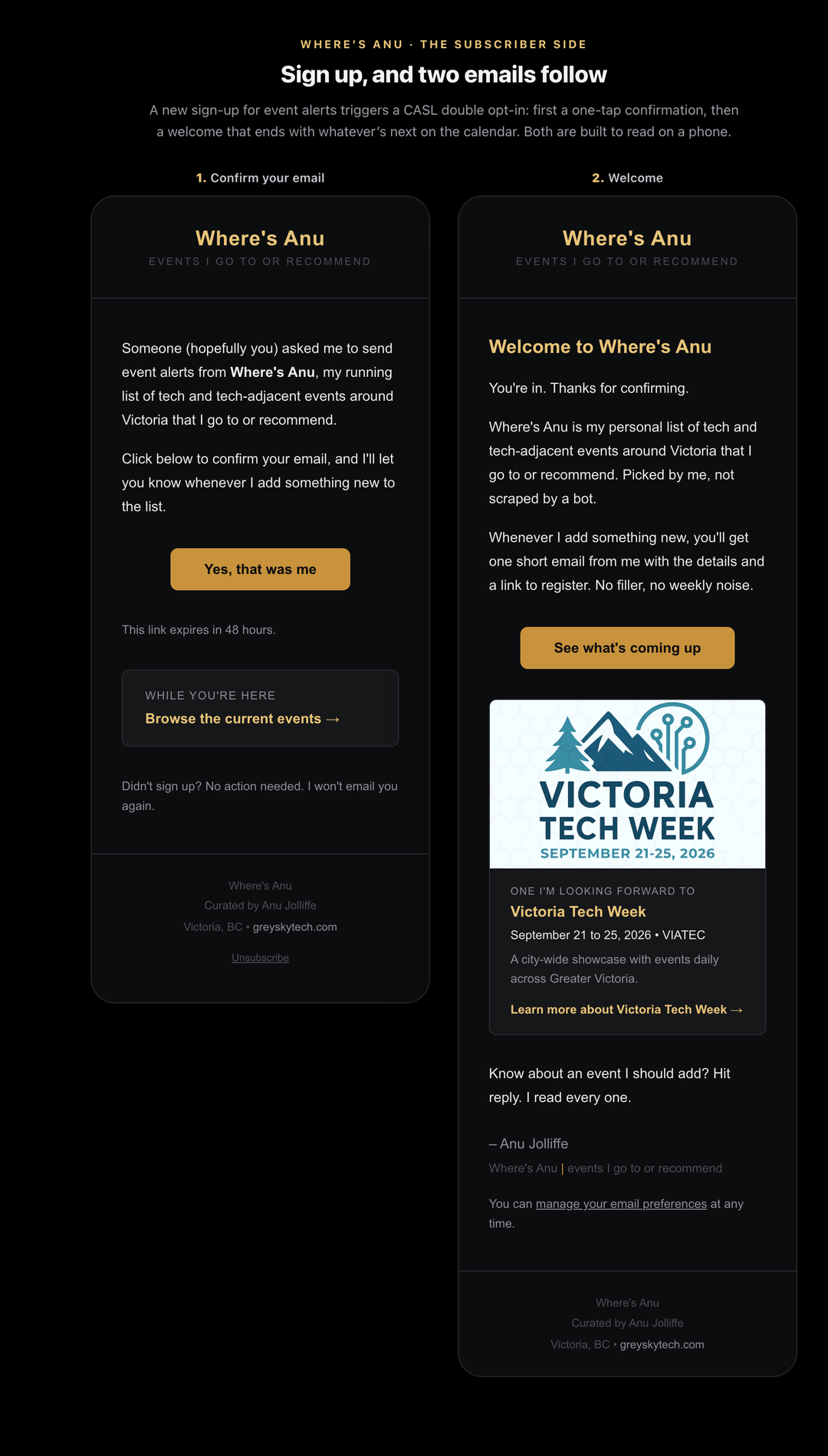
Put plainly, it is everything you would turn to Mailchimp or a similar product for. So how does doing it this way compare?
What you gain:
- No new monthly bill. The recurring cost, on top of the Microsoft 365 you already have, is $0.00.
- You own the data. Subscribers and events sit in your tenant, under your control, not on someone else's platform.
- One place for everything. The list is reachable by Microsoft 365 Copilot, Power Automate, Microsoft Teams, and the rest of Microsoft 365, so you can report and automate without exporting anything.
- Total control of the emails. Every message is fully customisable, with no third-party branding forced onto the bottom.
- Real protection. Double opt-in for legitimacy and a Cloudflare Turnstile check against spam are built in.
What you give up:
- The packaged dashboard. A ready-made product hands you drag-and-drop templates and analytics out of the box. This is shaped to fit you instead.
- Someone else's roadmap. You are not waiting on a vendor to add a feature. The flip side is that a change is a small job, not a setting you toggle.
- A proper one-time setup. It has to be set up correctly once. That is the work I do.
One honest caveat, since I would rather you hear it from me. This sends through Microsoft 365 for Business itself, which is built for real business email, not for blasting tens of thousands of marketing messages a day. Exchange Online caps and throttles high-volume sending on purpose, to protect the sending reputation your everyday email depends on. For a curated list of the size most small businesses actually have, that is a non-issue, and keeping it in-house is the whole point. And if you outgrow it, there is a clean upgrade path: the same setup can send through a very cost-effective, high-performance Azure-hosted service, so you scale up without starting over.
For a lot of small businesses, that trade is a clear win: the same capability, on infrastructure you already pay for, that you genuinely own.
If you want one of your own
If an events page like Where's Anu, or a mailing list that costs nothing extra to run, sounds useful, this is exactly the kind of thing I build. There is a one-time cost to set it up properly, and after that it is entirely yours, handed over working. This is the sort of automation and custom build Grey Sky Tech does every day.
So get in touch and I will walk you through how it works. And if you just want to see the live version, Where's Anu is right here. Bring your curiosity. It has taken me thirty years and counting, and it is still the best tool I own.
Frequently Asked Questions
Where's Anu is a live listing of the AI, data, and tech-adjacent events around Victoria, British Columbia, plus the occasional virtual event, that Anu Jolliffe personally attends or recommends. Each event shows the date, time, location, a registration link, and a short honest note on why it is worth attending. You can browse it as a list or a calendar at greyskytech.com/wheres-anu, and subscribe to be notified when new events are added.
Because it reuses infrastructure you already pay for. The subscriber list is stored as a SharePoint list inside your existing Microsoft 365 for Business tenant, and the confirmation and update emails are sent through that same environment. There is no separate mailing-list product and no per-subscriber fee, so the recurring cost on top of a standard Microsoft 365 for Business subscription is zero. The only cost is the one-time build and setup, which Grey Sky Tech handles.
In your own Microsoft 365 for Business tenant, as SharePoint lists that you own and control. Nothing is held on a third-party marketing platform. Because the data lives in Microsoft 365 for Business, you can reach it with the tools already included, such as Microsoft 365 Copilot, Power Automate, and Microsoft Teams, to report on it or automate around it. For a Canadian business, a tenant provisioned in a Canadian region can keep that data at rest in Canadian data centres.
For most small businesses, yes. It covers the essentials people rely on a product like Mailchimp for: a sign-up form, double opt-in confirmation, one-click unsubscribe, and fully customisable emails, with a Cloudflare Turnstile check to keep out bots. What you trade away is the packaged drag-and-drop dashboard and prebuilt templates. In return you own your data, pay nothing extra each month, and can automate the list with the rest of your Microsoft 365 for Business tools. The one case where it is not the right fit is very high-volume sending, because Microsoft 365 for Business email is not built for large marketing blasts. For a big list there is a clean upgrade path to a cost-effective Azure-hosted sending service.
No. Once it is set up, you manage events and subscribers from the ordinary Microsoft 365 for Business tools you already use, such as the SharePoint web view, a Microsoft Teams tab, or your phone. There is no separate admin system to learn and no code to touch for day-to-day changes, and Grey Sky Tech does the initial build and setup before handing it to you working. Being technical is not required, but it does open things up: because everything lives in Microsoft 365 for Business, a comfortable user can keep customising it over time, adding Power Automate flows, reporting with Microsoft 365 Copilot, or making their own tweaks, without waiting on anyone.
Related Service
Process automation, RPA, and intelligent chatbots that handle the busywork.
Learn about Automation