Why I Replaced Google Search With Microsoft 365 Copilot
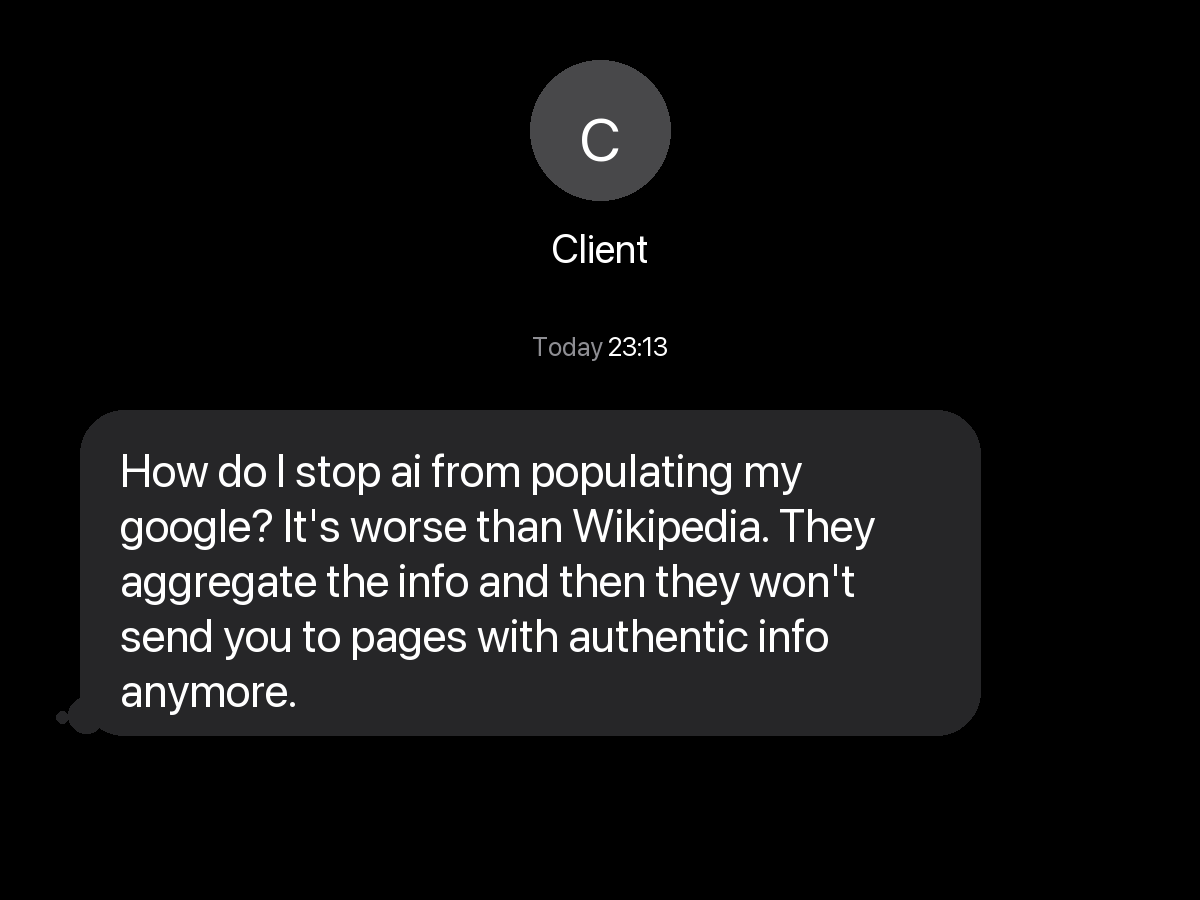
A client texted me at 23:13, fed up that AI summaries have buried the real sources in Google. My answer: I switched to Microsoft 365 Copilot two years ago.
TL;DR
Google's AI-first overhaul of Search has done what users feared: buried the authentic pages the open web used to send them to. The escape-hatch most people are picking is another public search engine, usually DuckDuckGo. For business research, that is the wrong move. My default for two years has been Microsoft 365 Copilot, because it searches the public web and my own Microsoft 365 business data across Outlook, OneDrive, SharePoint, and Teams together, synthesises the result, cites every source on both sides, and turns the answer into something I can share, schedule, or build on. Here is why I treat search as a tool that belongs inside the business, and what I told the client to do about it.
Let AI summarise and analyse this post for you:
A text message at 23:13
I got this message from a client late last night. It landed at 23:13, which tells you how much this is bothering people.
Read it again, because it is a sharp observation dressed up as a vent. The complaint has two parts. First, AI-generated summaries now sit on top of search results and answer the question before you ever click anything. Second, because nobody clicks through anymore, the original sources stop getting traffic, which means the authentic pages that did the real work lose their reason to exist.
My reply was short:
"I haven't used internet search for over 2 years, ever since Microsoft 365 Copilot was released."
That is the honest truth, and it usually stops people mid-sentence. I made that switch in early 2024, long before Google's AI overhaul was even on the horizon. Nobody outside Mountain View knew this was coming. So let me explain what I mean, why I made the move then, and why I am even more convinced of it now.
The rest of the world is finally catching up
The client's frustration is showing up in the numbers, and the trigger is recent. At its I/O conference in May 2026, just weeks ago, Google unveiled what it called the biggest change to the search box since it debuted more than 25 years ago, replacing the familiar list of links with an AI-first experience built around a reimagined search box. Writing for TechCrunch, Sarah Perez summed it up in a single line: "The era of the 'ten blue links' is officially over." When that change rolled out with no clean way to turn the summaries off, a lot of users went looking for the exit. DuckDuckGo was the obvious door.
DuckDuckGo's CEO Gabriel Weinberg said: "Google is force-feeding AI with no way to opt out." The company reported that U.S. app installs climbed 18.1% week over week on average between May 20 and May 25, 2026, peaking at 30.5% on May 25.
That instinct, the sense that something is broken and it is time to switch, is now driving thousands of people to find another tool. The difference is where you go next. Most are moving from one public search engine to another, swapping Google for DuckDuckGo and hoping for the best. I made my move two years earlier, and I did not move sideways. I recommend something entirely different, and I have had two years of daily use to prove it works.
What I use instead: Microsoft 365 Copilot
Since early 2024, when Microsoft 365 Copilot became available to Canadian businesses, it has been my first stop for almost any question that matters to my work. Not Google. Not a public chatbot. Microsoft 365 Copilot.
The reason is simple: a general search engine only knows the public internet. It has never read my email, my proposals, my client notes, or my pricing. So even on its best day, it can only ever give me a generic answer to a question that is rarely generic. Here are the three reasons Microsoft 365 Copilot replaced search for me.
Reason one: it knows my business, not just the web
This is the big one. Microsoft 365 Copilot works across two worlds at the same time. It can reach out to the public web, and it can reach into my own Microsoft 365 business environment data across Outlook, OneDrive, SharePoint, and Teams: my email and calendar in Outlook, my personal files in OneDrive, my shared documents and sites in SharePoint, and my Teams chats, channels, and meeting context.
That changes the kind of question I can ask. Instead of "what is a fair day rate for a fractional CTO in Canada," which a search engine can sort of answer, I can ask "based on the last three proposals I sent and the going rate for this kind of work, what should I quote this client." A search engine has no idea who I am. Microsoft 365 Copilot answers in the context of my actual business.
That is the part people miss. The value is not that it is an AI. The value is that it is an AI that has been invited inside the building.
Reason two: it understands and synthesises, then shows its work
For 25 years a search engine handed you a list of links and made you do the reading. Microsoft 365 Copilot reads first, then gives you a synthesised answer in plain language.
The fear, of course, is the exact thing my client was complaining about: if the AI just summarises everything, how do you know it is telling the truth, and how do the real sources survive? This is where Microsoft 365 Copilot is different from a faceless search summary. Every answer comes with citations and links back to where the information came from, on both sides of the business boundary. If it pulled a number from a public report, it links the report. If it pulled a detail from an email thread or a document in my SharePoint, it links that too. I can click through and check the original in seconds.
So I get the speed of a summary without losing the trail back to the truth. That is the balance the open web is failing to strike, and it is a big reason I trust it for real work.
Reason three: the answer is a starting point, not a dead end
With a normal search, the result is the end of the road. You read it, you close the tab, and the thinking starts over the next time. With Microsoft 365 Copilot, the answer is the beginning. Every response comes with a set of things I can actually do with it:
- Share it. Send the response straight to a colleague without copying and pasting into a new message.
- Work with it directly. Drop the answer into Microsoft 365 Copilot Pages or into Word and keep building on it alongside my other documents and business context, instead of letting it evaporate when I close the window.
- Schedule it to run again. I can turn a useful prompt into a scheduled prompt that runs on its own, for example every Monday morning, and have the result waiting for me. It runs against my full Microsoft 365 business data across Outlook, OneDrive, SharePoint, and Teams, which is perfect for a recurring "what do I need to know this week" briefing.
- Have it read aloud. When I want to absorb something while doing other things, it reads the response back to me.
- Follow the suggested next steps. It offers genuinely useful follow-ups, like "draft a LinkedIn post from this" or "explain how I would present this in a workshop," so the work keeps moving.
- Build on the history. My past conversations become part of the context for future questions, so it gets more useful the more I use it, rather than forgetting me the moment I leave.
That last point is the one that compounds. A search engine treats every query like we have never met. Microsoft 365 Copilot remembers the shape of my work.
So what did I tell the client?
You cannot undo what Google has done. It has decided that search is now an AI-first experience, and that is not a setting you or I can switch off. The install numbers above show that even Google's own users are giving up on it. What you can do is stop relying on a tool that was built to send you somewhere else and start using one that was built to actually answer you, inside the context of your own business.
For my client, that did not mean a clever browser setting. It meant rethinking what "search" is even for. If you are a business already paying for Microsoft 365, the better research tool is very likely already sitting one click away in the apps your team uses every day.
If your business already pays for Microsoft 365, the better research tool is one click away inside the apps your team uses every day. We help Canadian businesses turn that latent capability into daily practice. Book a Microsoft 365 Copilot session.
Frequently Asked Questions
Because it grounds its answers in both the public web and your own Microsoft 365 business environment data across Outlook, OneDrive, SharePoint, and Teams at the same time. Google and a public chatbot only know the open internet, so they can only give you generic answers. Microsoft 365 Copilot can factor in your Outlook email and calendar, your OneDrive files, your SharePoint sites and documents, and your Teams chats and meetings, which means the answer reflects your actual business situation rather than a stranger's average.
No. Your business content stays inside your organisation's Microsoft 365 boundary. When Microsoft 365 Copilot uses the web, it is reading public pages to inform an answer, not publishing your data outward. Your prompts and your company's documents are not used to train the underlying public AI models.
Yes. Responses include citations and links back to their sources. For public information, it links the web page. For something drawn from inside your business, it links the specific Microsoft 365 item it used, for example the Outlook email or calendar entry, the OneDrive or SharePoint document, or the Teams chat or meeting. You can click through and confirm the original, which is exactly what a plain AI search summary on the open web does not let you do.
It reached general availability for enterprise customers in late 2023, and access opened up to small and mid-sized businesses in early 2024. It is a paid, per-user add-on that sits on top of an eligible Microsoft 365 plan, such as Microsoft 365 Business Standard or Business Premium, so most teams already have the foundation it needs.
DuckDuckGo is a reasonable move if your goal is simply to get away from forced AI summaries on the public web, and the recent surge in its installs shows plenty of people are doing exactly that. But it is still a public search engine. It cannot see your business data, so it cannot answer questions in the context of your own work. The two tools solve different problems. If you want better research for your business specifically, Microsoft 365 Copilot is the one to look at.
Related Service
Strategic AI advisory and custom solutions built for your industry.
Learn about Artificial Intelligence